How to check your case for silent updates
The "last updated" timestamp lives in the case data your own myUSCIS account loads — never on the public status page. You can dig it out of the account data by hand (the "silent API update" trick that circulates in groups), but it's technical, easy to misread, and only ever shows the latest touch.
Simpler: we built a free Chrome extension that runs the same check through your own logged-in myUSCIS session — it never sees your password — and keeps every silent update it observes on your I-140. Install it, open the popup, and see what USCIS touched and when.
Desktop Chrome only — on a phone, open this page on your computer.
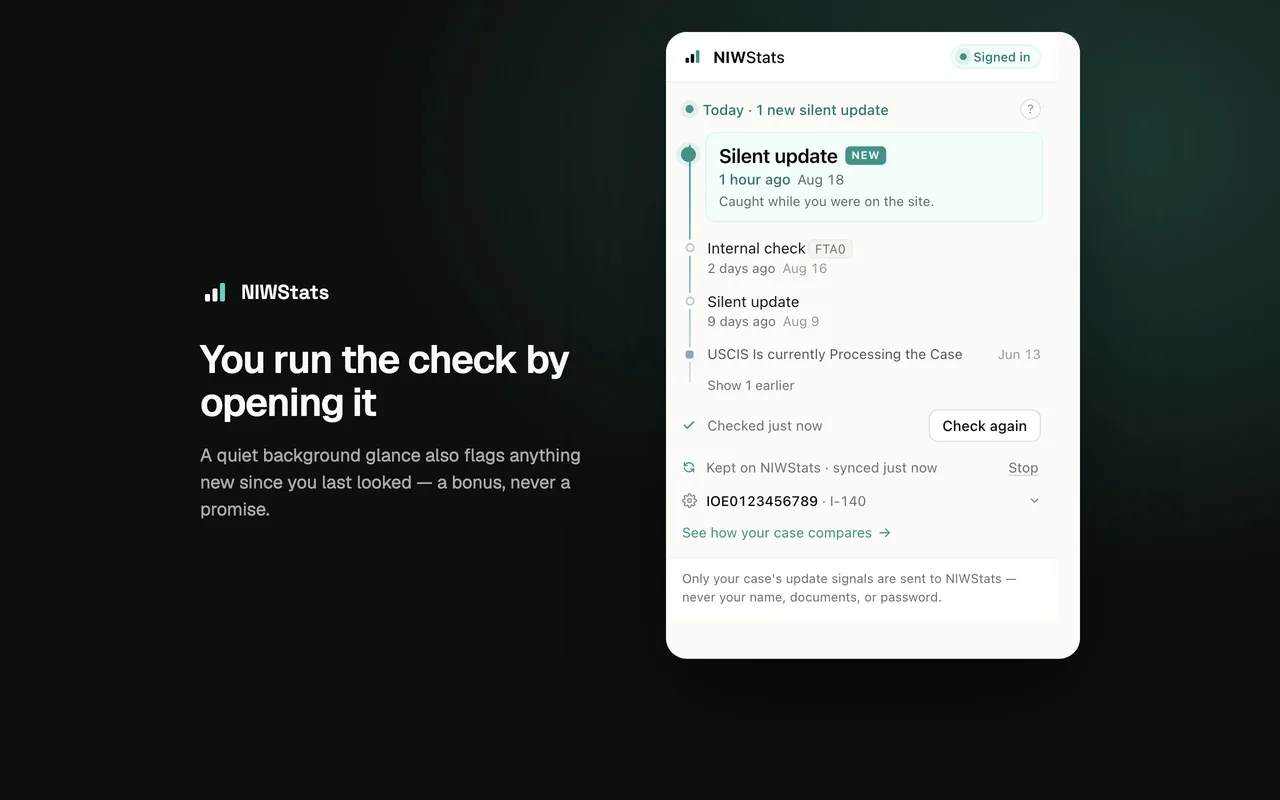
What a silent update is — and isn't
What it is. Your public status and your case record are two different things. The status page shows a few milestone phrases; the record behind it — the one myUSCIS reads — carries a "last updated" timestamp, and sometimes coded events too. When that timestamp moves and the public status doesn't, that's a silent update — also called a silent API update (longtime forum readers knew the idea as LUDs). A status page sitting unchanged for months is itself normal for an I-140; see typical processing times.
The catch. The record keeps only the latest touch — each new one overwrites the last, so checking by hand shows you one date, not a history. A timeline only exists if something watches continuously and writes each touch down, which is what the extension does from the day you install it.
What it means. Nobody outside USCIS knows. A silent update says your file was handled, not why. Some arrive with USCIS codes (FTA0 is common); we show them as-is and don't claim to know what they mean — anyone who says a touch predicts an approval, denial, or RFE is guessing. That's why the extension can sync, if you opt in: dates and event types only, so a few hundred cases laid side by side might reveal a pattern — if there is one. What we can measure is how cases end: every tracked decision and RFE as USCIS issues it, how outcomes are going and how RFEs play out.
What USCIS is deciding now
A silent update doesn't say how a case ends. These are the newest decisions NIWStats read from USCIS on tracked I-140s, as of October 2026.
In the most recent complete week (Sep 28 – Oct 4, 2026), cases shared on NIWStats recorded 12 approvals, 4 denials, and 19 RFEs.
Silent-update data on NIWStats is new and small — 8 silent updates kept so far, across 6 connected cases. We show counts, not conclusions, and every synced update is owner-authorized and day-granular. The rest of the site's figures come from 943 crowdsourced EB2-NIW cases. How we collect & count →
USCIS silent updates FAQ
What is a silent update from USCIS?
USCIS touching your case record without changing your public status. The record your own myUSCIS account reads gets a new "last updated" timestamp — sometimes a coded event too — while the status page shows the same phrase it's shown for months.
How do I check my case for silent updates?
Through your own myUSCIS account — by hand in the account data, or with the free extension above, which checks through your own session and keeps every update it sees. The record itself only ever holds the most recent touch.
Is a silent update the same as an LUD?
Same idea, new era. LUD — "last updated date" — is the old tracker-forum term. Public LUDs disappeared years ago; the timestamp lives on inside your own myUSCIS account data, and that's what gets called a silent update (or silent API update) today.
Does a silent update mean approval — or an RFE — is coming?
Nobody outside USCIS knows, and we don't pretend to. It means the file was handled. Whether the touches form patterns across many cases is exactly the question the synced data exists to answer — if there's an answer. What is measurable is timing: for premium cases, USCIS's first action (approval, denial, or RFE) lands at a median of ~43 business days from the I-907 receipt, and the NIWStats live queue shows which premium cases USCIS is acting on now, while the decisions feed lists every tracked case that moved, week by week. Open the live queue
My status changed but I got no email — is that a silent update?
No — a silent update is the record moving while the status page doesn't. If the status phrase itself changed, that's a visible update; USCIS notification emails simply aren't guaranteed to arrive for every change.
Is there a link to check USCIS silent updates?
There is no public USCIS page or link for it: the last-updated timestamp exists only inside your own myUSCIS account data. To see it, sign in to myUSCIS and read the case data by hand, or install the free NIWStats extension from the Chrome Web Store, which reads it through your logged-in session and keeps a history of every update it observes. Get the extension
Does checking need my USCIS password?
No. Checking rides the myUSCIS session you open by signing in as usual; the extension never sees your password and stops when myUSCIS signs you out. What it sees stays in your browser unless you explicitly opt in to sync.
See what USCIS is doing behind your status page
Free, checks through your own myUSCIS session, keeps every silent update it sees. Desktop Chrome.
Add to Chrome